 Americano Padel Manager
 Preview your padel tournament before creating it
Before you confirm a tournament, you should be able to answer three questions: how long it will run, what the match schedule actually looks like, and whether the players are spread evenly. That is exactly what the preview on the setup step shows in Americano Padel Manager: estimated duration, real rounds with real names, and balance indicators, all before you confirm anything.
The scenario is a familiar one. You set up a tournament for twelve players on two courts, you start it, and by the third round you realise it will take two and a half hours while your booking ends in one. Here is how to avoid that.

Why the wrong tournament gets created so often
A padel tournament comes down to three settings that interact with each other: the number of players, the number of courts and the number of points per match. The problem is that their combined effect is not intuitive.
Going from 12 to 14 players on two courts does not stretch the session by a couple of minutes. It changes the number of rounds, the number of players sitting out each round, and therefore the total duration, usually far more than you would expect. Points behave the same way: moving from 24 to 32 points per match lengthens every match by roughly a third, and that adds up across the whole session.
The result is that organisers discover these effects once the tournament has already started, when it is too late to change anything without frustrating everyone.
What the preview shows
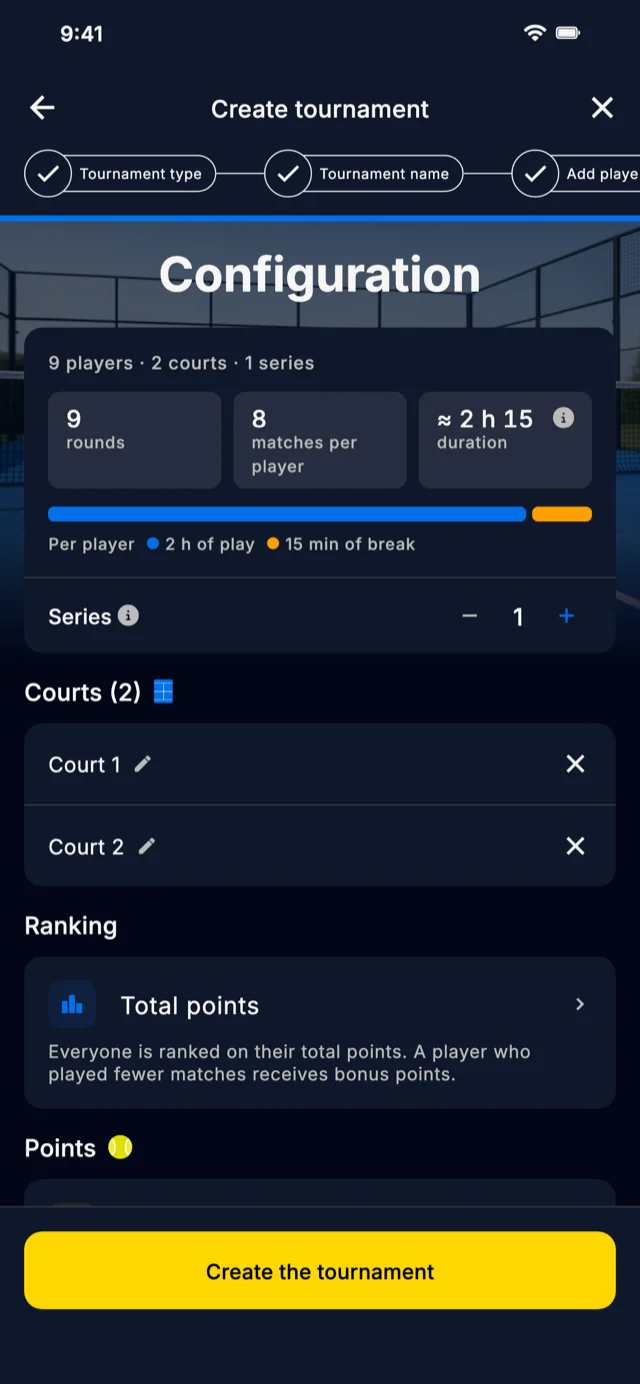
In Americano Padel Manager, the Setup step of the creation flow displays the tournament that will actually be created. This is not a theoretical estimate: the schedule on screen is the one that confirming will save.
The estimated duration
The app gives you the number of rounds, the number of matches and an estimated duration for the session, along with the breakdown behind it: a time per match derived from the point target you picked, plus a few minutes of setup before each match. The duration per round is shown too, which lets you think round by round when your booking is tight.
This is the most useful indicator, because it reacts immediately when you change the points or the number of courts.
The real match schedule
Below the numbers, you see the rounds with the actual player names, exactly as they will appear during the tournament. So you can check concretely who plays with whom, who starts on which court, and who sits out the first round.
The balance indicators
Three measures sum up the quality of the draw:
- Partners: how many times each player is paired with each other player
- Opponents: how many times each pair of players faces each other
- Rest: how many players sit out each round
Together these three tell you at a glance whether the tournament rotates everyone properly, or whether one player will spend the evening with the same partner while another never gets to sit down.
The missing match
When the player count does not divide cleanly, some players end up with one match fewer than the rest. The preview flags this explicitly and lets you decide who it applies to, rather than deciding for you.
The app then compensates for that gap in the standings: a player with fewer matches receives bonus points, so the leaderboard stays comparable for the whole session.
Using it to stay inside your booking
This is the main use of the preview, and it changes the way you prepare a session.
Start from your real constraint, which is almost always the court booking. If you have two courts from 7pm to 9pm, your budget is two hours, minus the welcome and briefing time, so roughly one hour forty of actual play.
Then enter your players and look at the duration the app reports. If it exceeds your budget, you have three levers, in this order:
- Cut the points per match. Going from 32 to 24 points is the most effective lever, and the one players notice least.
- Add a court if the club can free one up. That reduces the number of rounds needed and brings waiting time down.
- Cut the number of rounds, accepting that not everyone will meet everyone.
Adjust, watch the duration move, try again. The round trip takes a few seconds, against a whole tournament to find out the hard way. Our guides on how long an americano tournament lasts and on the two hour format give you the matching orders of magnitude.
Redrawing the schedule when it does not suit you
The preview is not just a read-only screen. If you do not like the schedule you are shown, you can regenerate it: the players are shuffled differently and a new schedule appears, which you can compare with the previous one on the same indicators.
That helps in two concrete situations. When two players of very different levels are paired from the first round and you would rather spread that gap out. And when a player you know is in a hurry happens to sit out the first round, when they would be better off playing straight away.
The rule is simple: what you see when you confirm is exactly what will be created. There is no second draw after confirmation.
Frequently asked questions
How can I know how long a padel tournament will last before starting it?
By previewing the setup. In Americano Padel Manager, the setup step shows an estimated duration based on the number of players, courts and points per match, with the breakdown behind the figure. The duration per round is shown as well, so you can adjust before creating the tournament instead of discovering it mid session.
Can the proposed match schedule be changed?
Yes. The preview lets you redraw the schedule, which shuffles the players and produces a different one, comparable to the previous schedule on the same balance indicators. The schedule on screen when you confirm is the one that gets created, with no new draw after confirmation.
What does the balance indicator of a tournament mean?
It sums up three things: how many times each player is paired with each other player, how many times each pair of players ends up on opposite sides, and how many players sit out each round. A good draw maximises the variety of partners and opponents while spreading the rest periods fairly.
What happens when a player gets one match fewer than the others?
That happens when the number of players does not divide cleanly into the available slots. The preview flags the situation and lets you choose who it applies to. In the standings, a player with fewer matches receives compensation points, so they stay comparable to the others for the whole session.
Is it easier to cut the points or to add a court?
Cutting the points per match is usually the most effective lever and the least visible one for the players: going from 32 to 24 points shortens each match by roughly a quarter. Adding a court mainly reduces the number of rounds and the waiting time, but it depends on what the club has available.
A well sized tournament is decided before it is created, not at the third round. Seeing the duration, the schedule and the balance at the moment you pick your settings avoids the session that overruns and the players who wait too long.
Americano Padel Manager shows all of this on the setup step, before confirmation, and lets you redraw the schedule until it suits you. The app is rated 4.9 out of 5 and used in more than 75 countries, with a free download on iPhone and Android and a 7 day premium trial. To size your group, read our guide on the number of players in an americano.